
Funcionalidades
Actualización automática (Triggers)
Cómo la app mantiene los valores al día sola: qué cambios de Jira escucha, cómo configurarlos y cómo ver qué se recalculó.
Cómo funciona
La app sabe qué datos lee cada fórmula. Cuando Jira avisa de un cambio, comprueba si afecta a algún campo fórmula y, si es así, recalcula solo las issues afectadas y guarda el nuevo valor en Jira. No hace falta abrir la issue.
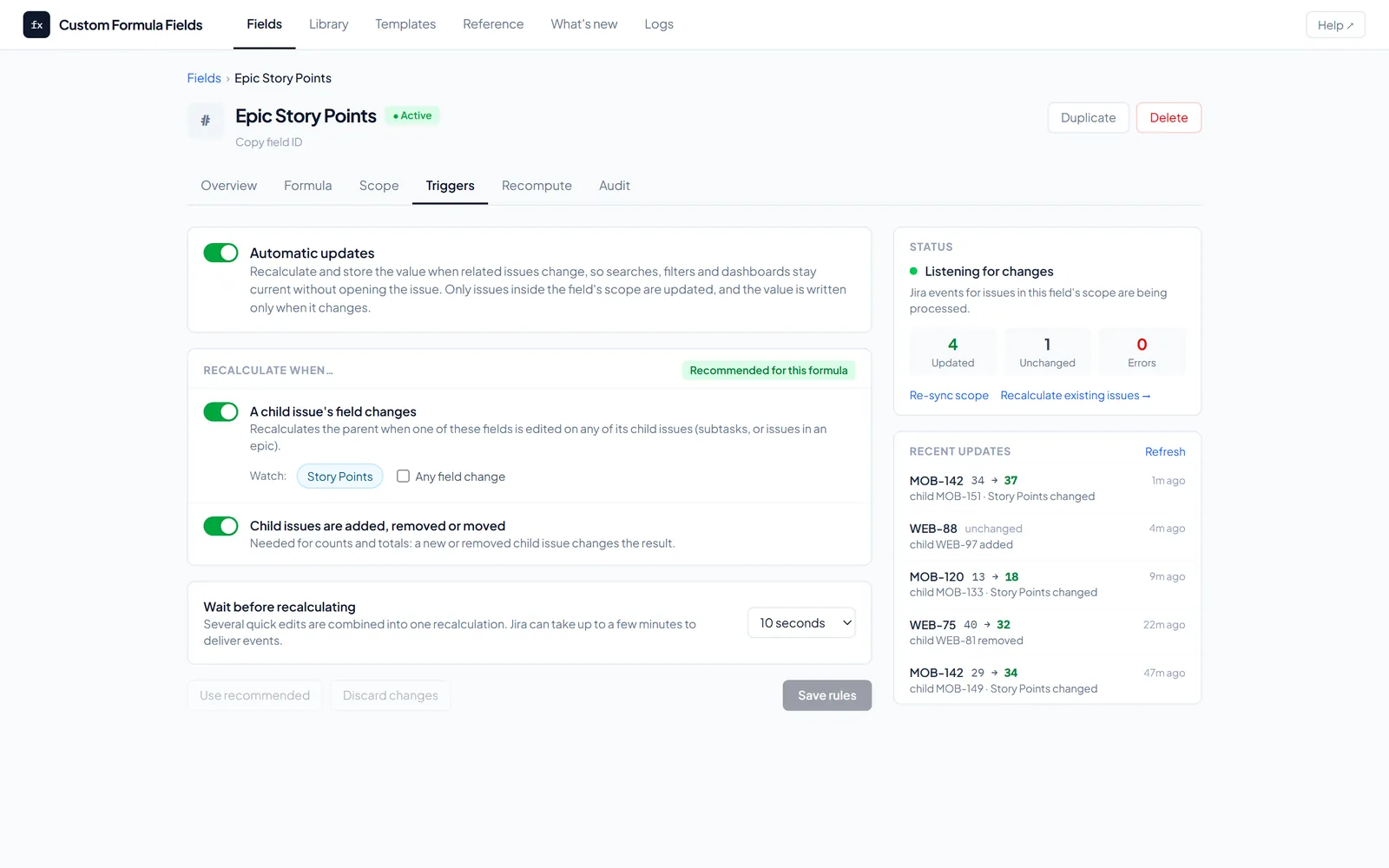
Qué cambios escucha
La pestaña Triggers muestra solo las reglas que tienen sentido para la fórmula:
| Regla | Recalcula | Aparece si la fórmula… |
|---|---|---|
| A child issue's field changes | La issue padre | lee campos de las hijas |
| Child issues are added, removed or moved | El padre anterior y el nuevo | usa children |
| A field on the issue itself changes | La propia issue | lee campos de la issue |
| Issue links are added or removed | Las dos issues enlazadas | usa linkedIssues |
| A linked issue's field changes | Todas las issues enlazadas con la editada | lee campos de las enlazadas |
En las reglas de campos puedes elegir qué campos concretos disparan el recálculo. Si cambias algo, la etiqueta pasa de Recommended for this formula a Customised. Si una regla apagada puede dejar valores desactualizados, la app lo avisa en The value can go out of date.
Cadenas de fórmulas
Una fórmula puede leer otro campo fórmula. Cuando el primero cambia, los que dependen de él se recalculan después, de forma automática, hasta tres saltos en cadena. Por ejemplo: el coste de una historia cambia, se recalcula el coste del epic y, después, el presupuesto restante del epic.
Espera antes de recalcular
Wait before recalculating junta varias ediciones seguidas en un solo recálculo. Opciones: inmediatamente, 10 segundos (por defecto), 30 segundos, 1 minuto o 5 minutos. Ten en cuenta que Jira puede tardar algo en entregar sus eventos, así que un valor puede tardar unos segundos más en verse.
Encender y apagar
El interruptor Automatic updates apaga la actualización de un campo sin tocar su fórmula. Con ella apagada, el valor solo cambia con el botón ↻ de la issue o con un recálculo.
Actualizaciones recientes
Recent updates lista los últimos recálculos: issue, valor anterior y nuevo, y el motivo (por ejemplo child MOB-151 · Story Points changed). Arriba se ve el estado: Listening for changes, Not listening o un aviso si el campo no tiene alcance.
Re-sync scope
Si cambias contextos del campo desde la configuración de Jira en lugar de desde la app, pulsa Re-sync scope para que la app lo tenga en cuenta. La app también lo hace sola una vez al día.
El botón ↻ de la issue
En cada issue, junto al valor, el botón ↻ recalcula ese campo en ese momento. Lo puede usar cualquiera que vea la issue y solo afecta a esa issue y ese campo.
Features
Automatic updates (Triggers)
How the app keeps values up to date by itself: which Jira changes it listens to, how to configure them and how to see what was recalculated.
How it works
The app knows which data each formula reads. When Jira reports a change, it checks whether any formula field is affected and, if so, recalculates only the issues affected and stores the new value in Jira. Nobody needs to open the issue.
What changes it listens to
The Triggers tab only shows the rules that make sense for the formula:
| Rule | Recalculates | Shown if the formula… |
|---|---|---|
| A child issue's field changes | The parent issue | reads child fields |
| Child issues are added, removed or moved | The old and the new parent | uses children |
| A field on the issue itself changes | The issue itself | reads the issue’s own fields |
| Issue links are added or removed | Both linked issues | uses linkedIssues |
| A linked issue's field changes | Every issue linked to the edited one | reads linked issue fields |
In field rules you can choose which specific fields trigger a recalculation. If you change anything, the label switches from Recommended for this formula to Customised. If a rule you turned off can leave values outdated, the app warns you under The value can go out of date.
Formula chains
A formula can read another formula field. When the first one changes, the fields that depend on it recalculate afterwards, automatically, up to three hops in a chain. For example: a story's cost changes, the epic's cost recalculates and then the epic's remaining budget.
Wait before recalculating
Wait before recalculating merges several edits in a row into one recalculation. Options: immediately, 10 seconds (default), 30 seconds, 1 minute or 5 minutes. Keep in mind that Jira can take a moment to deliver its events, so a value may take a few extra seconds to show.
Turning it on and off
The Automatic updates switch turns updates off for a field without touching its formula. While off, the value only changes with the issue's ↻ button or a recompute.
Recent updates
Recent updates lists the latest recalculations: issue, old and new value, and the reason (for example child MOB-151 · Story Points changed). The status is shown on top: Listening for changes, Not listening or a warning if the field has no scope.
Re-sync scope
If you change the field’s contexts from Jira settings instead of from the app, click Re-sync scope so the app picks it up. The app also does this by itself once a day.
The ↻ button on the issue
On every issue, next to the value, the ↻ button recalculates that field right away. Anyone who can see the issue can use it, and it only affects that issue and that field.
¿No encuentras algo? Escríbenos aCan't find something? Write to contacto@fluxor-tech.com · Ver la ficha del productoSee the product page