
Funcionalidades
Recálculo (Recompute)
Calcula de una vez el valor de muchas issues: al crear un campo, al cambiar su fórmula o al ampliar su alcance.
Cuándo usarlo
La actualización automática reacciona a cambios. Las issues que no cambian conservan su valor anterior, o ninguno si el campo es nuevo. Lanza un recálculo cuando:
- acabas de crear el campo;
- has cambiado la fórmula o una variable de la Library que usa;
- has añadido proyectos o tipos de issue al alcance.
Paso a paso
- Abre el campo y ve a la pestaña Recompute.
- Opcional: escribe un filtro JQL para acotar, por ejemplo
project = ABC AND issuetype = Epic. Se combina con el alcance del campo. - Pulsa Analyze. Verás cuántas issues se van a procesar y una estimación del trabajo.
- Pulsa Recompute N issue(s). Empieza en segundo plano.
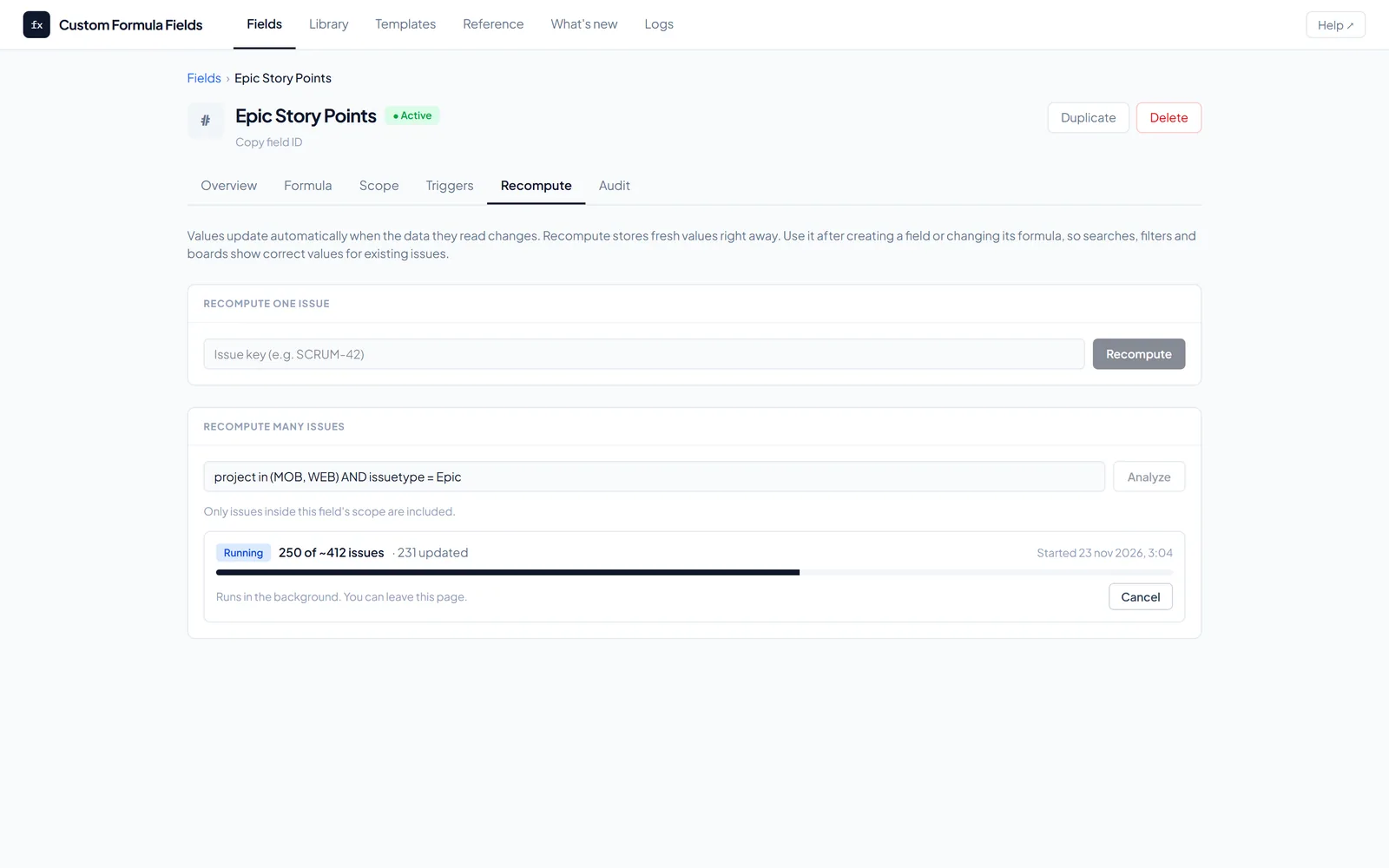
Una sola issue
Arriba de la pestaña puedes escribir la clave de una issue (por ejemplo ABC-42) y pulsar Recompute para recalcular solo esa. Es lo mismo que el botón ↻ de la issue.
Durante el recálculo
- Verás una barra de progreso con issues procesadas, valores escritos y errores.
- Puedes cerrar la página: el trabajo sigue. Al volver verás el progreso.
- Puedes pulsar Cancel en cualquier momento. Lo ya escrito se queda.
- Si hay errores, Show errors muestra ejemplos con la issue y el motivo.
Qué significa el análisis
| Dato | Significado |
|---|---|
| Issues afectadas | Las que encajan en el alcance y en tu filtro JQL. |
| Coste por issue | Llamadas a Jira que necesita cada cálculo. Sube si la fórmula lee hijas o enlazadas. |
| Avisos | Por ejemplo, si hay más de 2.000 issues el trabajo puede tardar varios minutos. |
Si el campo tiene alcance global
Sin proyectos en el alcance, la app pide un filtro JQL para saber qué issues procesar.
Rendimiento
El trabajo avanza por tandas de 50 issues. Una fórmula que solo lee campos de la propia issue es muy rápida; una que lee hijas o enlazadas necesita más llamadas a Jira por issue. Más detalles en Límites.
Features
Recompute
Calculate the value of many issues at once: after creating a field, changing its formula or widening its scope.
When to use it
Automatic updates react to changes. Issues that don't change keep their old value, or none if the field is new. Run a recompute when:
- you have just created the field;
- you changed the formula or a Library variable it uses;
- you added projects or issue types to the scope.
Step by step
- Open the field and go to the Recompute tab.
- Optional: type a JQL filter to narrow it, for example
project = ABC AND issuetype = Epic. It is combined with the field’s scope. - Click Analyze. You’ll see how many issues will be processed and an estimate of the work.
- Click Recompute N issue(s). It starts in the background.
A single issue
At the top of the tab you can type an issue key (for example ABC-42) and click Recompute to recalculate just that one. It is the same as the issue’s ↻ button.
While it runs
- A progress bar shows issues processed, values written and errors.
- You can close the page: the job keeps going. Come back to see its progress.
- You can click Cancel at any time. Whatever was written stays.
- If there are errors, Show errors lists examples with the issue and the reason.
What the analysis means
| Item | Meaning |
|---|---|
| Affected issues | Issues that match the scope and your JQL filter. |
| Cost per issue | Jira calls each calculation needs. It goes up when the formula reads children or linked issues. |
| Warnings | For example, above 2,000 issues the job can take several minutes. |
If the field has a global scope
With no projects in the scope, the app asks for a JQL filter to know which issues to process.
Performance
The job moves in batches of 50 issues. A formula that only reads the issue's own fields is very fast; one that reads children or linked issues needs more Jira calls per issue. More in Limits.
¿No encuentras algo? Escríbenos aCan't find something? Write to contacto@fluxor-tech.com · Ver la ficha del productoSee the product page