
Funcionalidades
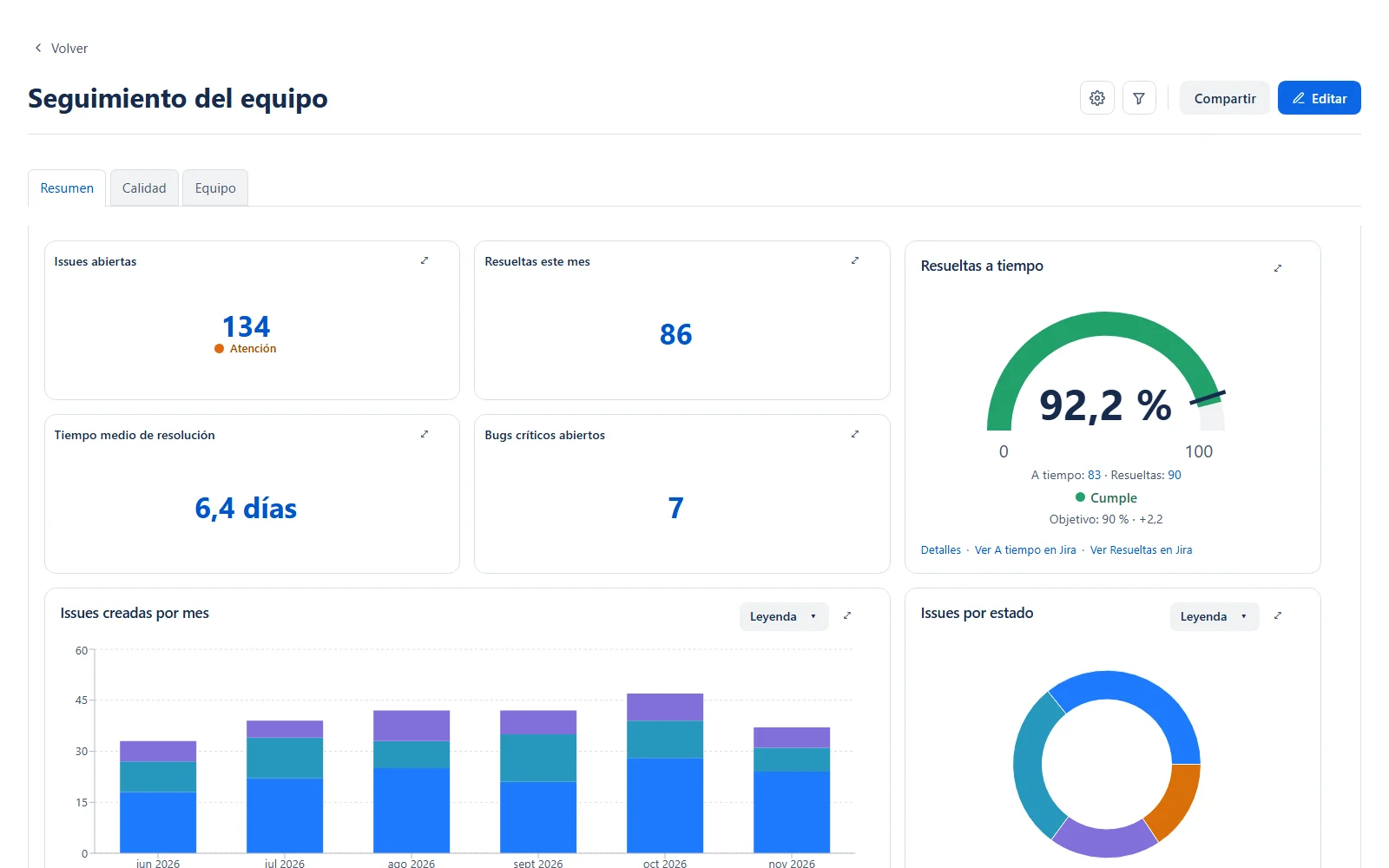
Indicadores: tarjeta, KPI y medidor
Gráficas que muestran un solo número: un recuento, un porcentaje o una diferencia entre dos consultas, con objetivo y semáforo.
Los tres indicadores
| Tipo | Qué muestra |
|---|---|
| Tarjeta | Un número grande: cuántas issues devuelve la JQL. |
| KPI | El número con un semáforo según un objetivo. |
| Medidor | Un arco de 0 a un máximo, con el valor, el objetivo y el semáforo. |
Los indicadores no se agrupan ni se dividen: solo cuentan. Tarjeta y KPI pueden ocupar una sola celda de la rejilla.
Valor: recuento, porcentaje o diferencia
En Valor eliges qué número calcula el indicador:
| Valor | Cálculo | Disponible en |
|---|---|---|
| Recuento | Issues que devuelve la JQL. | Tarjeta, KPI, medidor |
| Porcentaje (A ÷ B × 100) | Issues de la JQL A entre las de la JQL B, con un decimal. | Tarjeta, KPI, medidor |
| Diferencia (A − B) | Issues de A menos issues de B. Puede ser negativa. | Tarjeta, KPI |
| Duración entre dos fechas | Días entre dos fechas. Ver Duraciones. | Tarjeta, KPI |
Con porcentaje o diferencia aparecen JQL A y JQL B, con un nombre opcional para cada una (Nombre de A, Nombre de B). Jira da los dos recuentos directamente, según tus permisos. Para un porcentaje, B debería incluir las issues de A:
JQL A: project = MOB AND created >= startOfQuarter() AND resolution is not EMPTY
JQL B: project = MOB AND created >= startOfQuarter()
Si el dashboard filtra por periodo, Fecha del periodo de B decide qué fecha de B se filtra. Por defecto, Igual que A.
Objetivo y semáforo
KPI y medidor tienen la sección Objetivo y semáforo:
| Campo | Qué hace |
|---|---|
| Objetivo | El valor a alcanzar. Vacío, el indicador muestra Sin objetivo. |
| Umbral de aviso | Opcional. Entre el objetivo y este valor el estado es Atención. Necesita un objetivo. |
| Mejor si es | Mayor (más es mejor) o Menor (menos es mejor). |
| Máximo | Solo en el medidor: el final del arco. Vacío, se calcula solo. |
Los valores son números enteros entre 0 y 10.000.000; con Diferencia, entre −10.000.000 y 10.000.000.
| Estado | Cuándo |
|---|---|
| Cumple (verde) | El valor alcanza el objetivo. |
| Atención (ámbar) | No lo alcanza, pero está dentro del umbral de aviso. |
| No cumple (rojo) | No alcanza el objetivo ni el umbral. |
| Sin objetivo | No hay objetivo. |
| Sin evaluar | Los datos son parciales y Jira no dio un total, o no hay datos. |
El estado se escribe siempre junto al color, así que se entiende también sin distinguir colores.
Reglas del umbral
Con Mejor si es mayor, el aviso tiene que ser menor que el objetivo. Con Mejor si es menor, mayor. El formulario lo comprueba antes de guardar.
Máximo automático del medidor
Si no indicas Máximo, el medidor usa una cifra redonda (1, 2, 2,5 o 5 multiplicado por una potencia de 10) al menos un 20 % mayor que el mayor de valor, objetivo y umbral. En un porcentaje que no pasa de 100, el máximo es 100.
Cifras aproximadas
Si una tarjeta no ha podido contar todas las issues, muestra ~N (total aproximado de Jira) o
más de N. El semáforo usa el total aproximado; sin él, queda Sin evaluar: datos parciales.
Features
Indicators: card, KPI and gauge
Charts that show a single number: a count, a percentage or a difference between two queries, with a goal and a traffic light.
The three indicators
| Type | What it shows |
|---|---|
| Tarjeta (card) | A big number: how many issues the JQL returns. |
| KPI | The number with a traffic light based on a goal. |
| Medidor (gauge) | An arc from 0 to a maximum, with the value, the goal and the traffic light. |
Indicators are not grouped or split: they only count. Cards and KPIs can take a single grid cell.
Value: count, percentage or difference
In Valor (value) you choose which number the indicator calculates:
| Value | Calculation | Available in |
|---|---|---|
| Recuento (count) | Issues returned by the JQL. | Card, KPI, gauge |
| Porcentaje (A ÷ B × 100) (percentage) | Issues in JQL A divided by those in JQL B, with one decimal. | Card, KPI, gauge |
| Diferencia (A − B) (difference) | Issues in A minus issues in B. It can be negative. | Card, KPI |
| Duración entre dos fechas (duration) | Days between two dates. See Durations. | Card, KPI |
With percentage or difference you get JQL A and JQL B, each with an optional name (Nombre de A, Nombre de B). Jira provides both counts directly, according to your permissions. For a percentage, B should include A's issues:
JQL A: project = MOB AND created >= startOfQuarter() AND resolution is not EMPTY
JQL B: project = MOB AND created >= startOfQuarter()
If the dashboard is filtered by period, Fecha del periodo de B (period date of B) decides which date of B is filtered. By default, Igual que A (same as A).
Goal and traffic light
KPI and gauge have the Objetivo y semáforo (goal and traffic light) section:
| Field | What it does |
|---|---|
| Objetivo (goal) | The value to reach. Empty, the indicator shows Sin objetivo (no goal). |
| Umbral de aviso (warning threshold) | Optional. Between the goal and this value the state is Atención. It needs a goal. |
| Mejor si es (better if) | Mayor (higher is better) or Menor (lower is better). |
| Máximo (maximum) | Gauge only: the end of the arc. Empty, it is calculated automatically. |
Values are whole numbers between 0 and 10,000,000; with Diferencia, between −10,000,000 and 10,000,000.
| State | When |
|---|---|
| Cumple (green) | The value reaches the goal. |
| Atención (amber) | It doesn't reach it but is within the warning threshold. |
| No cumple (red) | It reaches neither the goal nor the threshold. |
| Sin objetivo | There is no goal. |
| Sin evaluar (not evaluated) | Data is partial and Jira gave no total, or there is no data. |
The state is always written next to the color, so it can be read without telling colors apart.
Threshold rules
With Mejor si es mayor the warning must be lower than the goal. With Mejor si es menor, higher. The form checks it before saving.
Automatic gauge maximum
If you leave Máximo empty, the gauge uses a round figure (1, 2, 2.5 or 5 times a power of 10) at least 20% above the largest of value, goal and threshold. For a percentage that doesn't exceed 100, the maximum is 100.
Approximate figures
If a card couldn't count every issue, it shows ~N (Jira's approximate total) or más de N
(more than N). The traffic light uses the approximate total; without it, it stays Sin evaluar: datos
parciales.
¿No encuentras algo? Escríbenos aCan't find something? Write to contacto@fluxor-tech.com · Ver la ficha del productoSee the product page